Connect → Your API key
Get your AxForge API key
Every guide in Connect needs one thing from us: an API key. It takes a minute, and one key works with every tool and every model.
- An AxForge account. Open the console and sign up; every new account gets free tokens every 30 days.
-
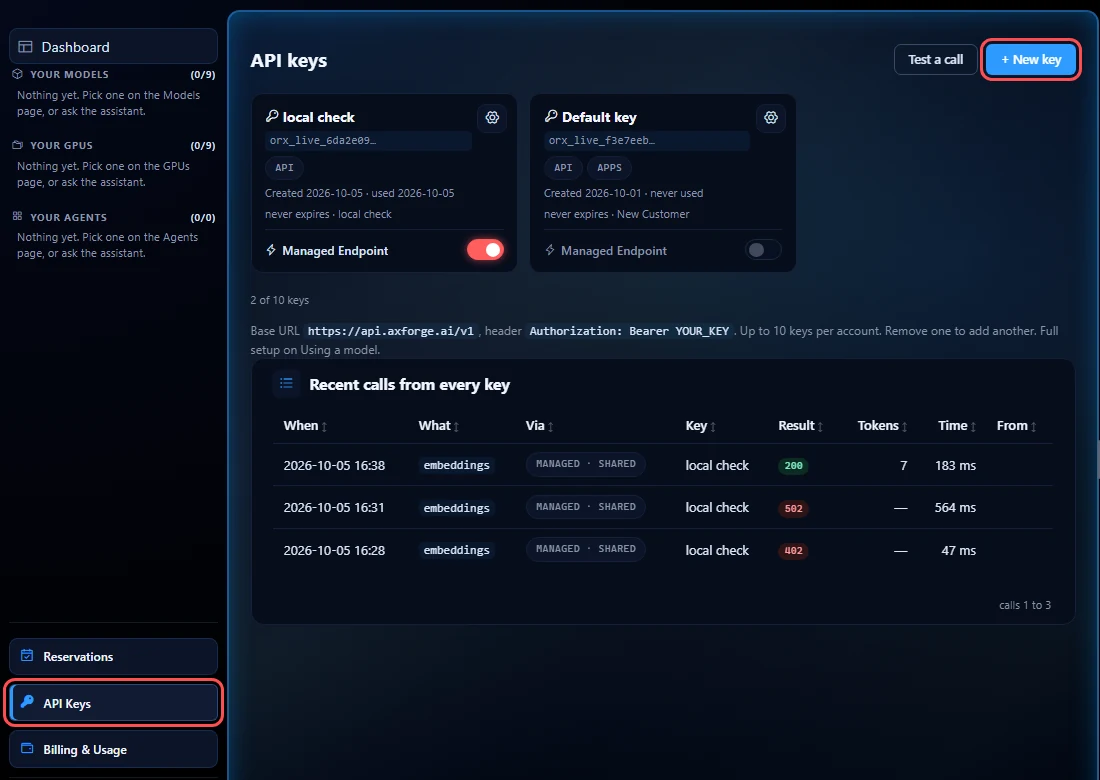
Open API Keys
In the console, pick API Keys in the left menu, then + New key.
-
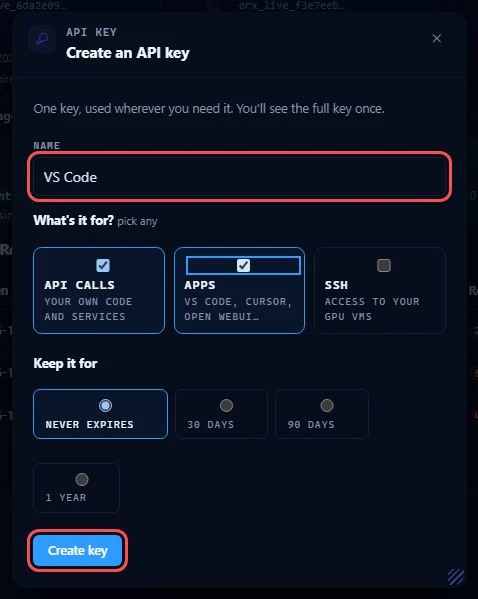
Name it and create it
Name the key after where it will live, for example VS Code, so you can tell your keys apart later. Tick what it is for: Apps for an editor or a chat app, API calls for your own code. Either one works with every guide. Then press Create key.
-
Copy it now
The full key is shown once. Press Copy and paste it straight into your tool or a password manager. We keep only a hash of it, so a lost key cannot be shown again: make a new one and remove the old one.

The three settings every guide uses
| Setting | Value |
|---|---|
| Base URL | https://api.axforge.ai/v1 |
| API key | your key, it starts with orx_live_ |
| Model | qwen3.8-27b-nvfp4, glm-5.3-flash or mimo-v2.6-flash |
Which model
All three take 262,144 tokens of context and can call tools, so any of them can drive a coding agent. On the same small coding task (2026-10-17):
| Model | Pick it for | Good to know |
|---|---|---|
qwen3.8-27b-nvfp4 | Your everyday default. The one that reads images: screenshots, diagrams, photos. | Answers straight away. |
glm-5.3-flash | Harder tasks where a careful plan pays off. | Thinks before it answers, so the first word takes longer. Leave it room: a very small max_tokens can end before the answer starts. |
mimo-v2.6-flash | Quick edits, short questions, chat. | The fastest of the three. |
Prices for each are on Models & pricing.
Keep the key out of your code
Most guides read the key from an environment variable called AXFORGE_API_KEY, so it never lands
in a file you share. Set it once per terminal:
export AXFORGE_API_KEY="orx_live_your_key_here"$env:AXFORGE_API_KEY = "orx_live_your_key_here"set AXFORGE_API_KEY=orx_live_your_key_hereCheck the key works
curl https://api.axforge.ai/v1/chat/completions \
  -H "Authorization: Bearer $AXFORGE_API_KEY" \
  -H "Content-Type: application/json" \
  -d '{"model":"qwen3.8-27b-nvfp4","messages":[{"role":"user","content":"Say hello"}]}'
$call = @{
Method = "Post"
Uri = "https://api.axforge.ai/v1/chat/completions"
Headers = @{ Authorization = "Bearer $env:AXFORGE_API_KEY" }
ContentType = "application/json"
Body = '{"model":"qwen3.8-27b-nvfp4","messages":[{"role":"user","content":"Say hello"}]}'
}
(Invoke-RestMethod @call).choices[0].message.contentcurl.exe https://api.axforge.ai/v1/chat/completions ^
-H "Authorization: Bearer %AXFORGE_API_KEY%" ^
-H "Content-Type: application/json" ^
-d "{\"model\":\"qwen3.8-27b-nvfp4\",\"messages\":[{\"role\":\"user\",\"content\":\"Say hello\"}]}"A reply with a choices list means the key works. A 401 means the key was
not pasted whole: copy it again, or make a new one.