Connect → LibreChat
Use AxForge with LibreChat
LibreChat is an open-source chat app you
host yourself. AxForge goes in as a custom endpoint in its librechat.yaml, and our models
show in its menu under AxForge.
- An AxForge API key. Get one (a minute).
- LibreChat running with Docker, as in its own guide. This guide was tried with LibreChat v0.8.7 on 2026-10-17.
Set it up
-
Add AxForge in librechat.yaml
In LibreChat's folder, create
librechat.yaml:version: 1.3.13 cache: true endpoints: custom: - name: 'AxForge' apiKey: '${AXFORGE_API_KEY}' baseURL: 'https://api.axforge.ai/v1' models: default: - 'qwen3.8-27b' - 'glm-5.3-flash' - 'mimo-v2.6-flash' fetch: false titleConvo: true titleModel: 'mimo-v2.6-flash' modelDisplayLabel: 'AxForge'fetch: falsekeeps the menu to these three chat models.titleModelnames each new chat with the fastest one. -
Put your key in .env
Add one line to LibreChat's
.env;${AXFORGE_API_KEY}above reads it from there:AXFORGE_API_KEY=orx_live_your_key_here -
Let Docker see the file, and restart
LibreChat's Docker setup reads
librechat.yamlthrough an override file next to itsdocker-compose.yml:services: api: volumes: - type: bind source: ./librechat.yaml target: /app/librechat.yamldocker compose down docker compose up -d -
Pick the model
Open LibreChat (sign up: the first account is a local one), open the model menu at the top, choose AxForge and then
qwen3.8-27b.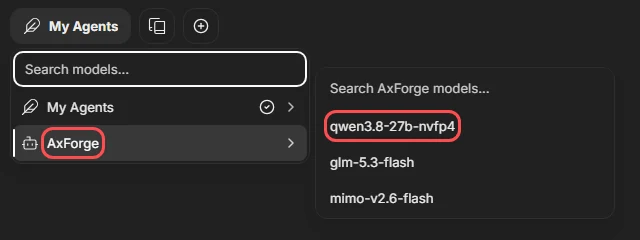
-
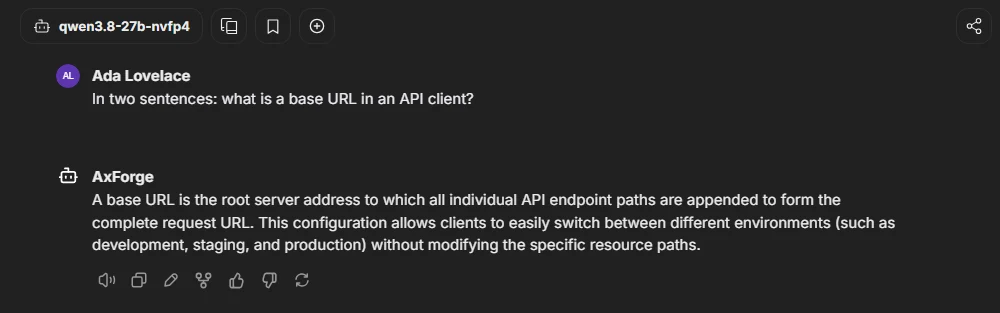
Ask something
The settings
| Key in librechat.yaml | Value |
|---|---|
| baseURL | https://api.axforge.ai/v1 |
| apiKey | ${AXFORGE_API_KEY}, from .env |
| models.default | qwen3.8-27b, glm-5.3-flash, mimo-v2.6-flash |
| titleModel | mimo-v2.6-flash |
Which model for what: qwen3.8-27b is the
everyday default and reads images, glm-5.3-flash thinks before it answers,
mimo-v2.6-flash is the fastest.
Check that it works
AxForge is in the model menu with our three models, and a question gets an answer. The calls show in the console under API Keys → Recent calls within a minute.
When it does not work
Not sure which it is? The connection doctor makes seven small
checks on your key and names the fix: irm https://dev.axforge.ai/assets/axforge-doctor.ps1 | iex in
PowerShell, curl -fsSL https://dev.axforge.ai/assets/axforge-doctor.sh | bash on macOS and Linux.
| What you see | What it means | Fix |
|---|---|---|
| No AxForge in the menu | LibreChat did not read librechat.yaml | check the override file, then docker compose down and up -d |
| "Invalid API key. Create one at https://console.axforge.ai/keys." | AXFORGE_API_KEY is missing from .env, or the key was refused | add the line, the key whole, and restart |
Test a call says in one click whether a problem is your key, your balance or us.