Connect → Qwen Code
Use AxForge with Qwen Code
Qwen Code is the Qwen team's coding agent for the terminal. It takes any OpenAI-compatible service from three environment variables, and it is at home on Qwen3.8 27B.
- An AxForge API key. Get one (a minute).
- Node.js 20 or newer. This guide was tried with Qwen Code 0.25.2 on 2026-10-17.
Set it up
-
Install Qwen Code
npm install -g @qwen-code/qwen-code -
Point it at AxForge
export OPENAI_API_KEY="orx_live_your_key_here"
export OPENAI_BASE_URL=https://api.axforge.ai/v1
export OPENAI_MODEL=qwen3.8-27b-nvfp4
$env:OPENAI_API_KEY = "orx_live_your_key_here" $env:OPENAI_BASE_URL = "https://api.axforge.ai/v1" $env:OPENAI_MODEL = "qwen3.8-27b-nvfp4"They last until you close this terminal. Start Qwen Code from the same one.
-
Tell it the model's size
Qwen Code takes our model for a bigger Qwen and would count on a million tokens. Ours read 262,144 at once. Create
~/.qwen/settings.json(on Windows%USERPROFILE%\.qwen\settings.json):{ "model": { "generationConfig": { "contextWindowSize": 262144 } } }With it, Qwen Code shortens a long session before it reaches our limit.
-
Start it in your project
cd my-project
qwen
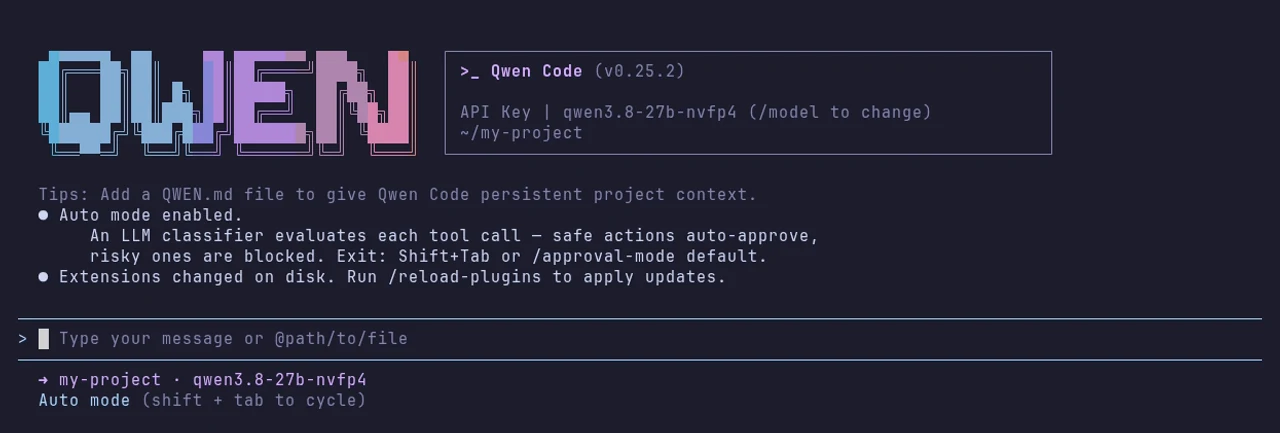
The box at the top says API Key | qwen3.8-27b-nvfp4: it runs on your AxForge key.
-
Give it a task
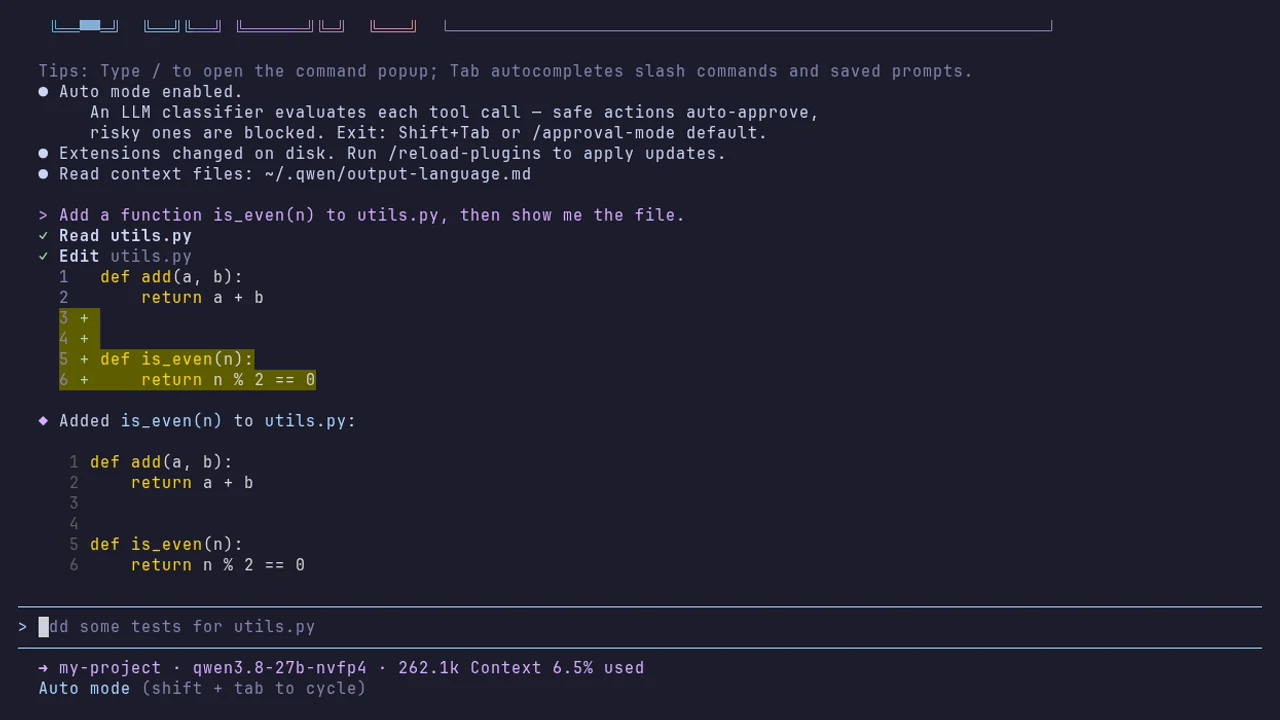
Ask in plain words. It reads the file, edits it and shows the result. In its default Auto mode it approves safe steps itself and stops risky ones; Shift+Tab changes that.
The settings
| Variable | Value |
|---|---|
| OPENAI_API_KEY | your AxForge key |
| OPENAI_BASE_URL | https://api.axforge.ai/v1 |
| OPENAI_MODEL | qwen3.8-27b-nvfp4, glm-5.3-flash or mimo-v2.6-flash |
| contextWindowSize (~/.qwen/settings.json) | 262144 |
Which model for what: qwen3.8-27b-nvfp4 is the
everyday default and reads images, glm-5.3-flash thinks before it answers,
mimo-v2.6-flash is the fastest.
Check that it works
The box at the top says API Key and your model, the footer says 262.1k Context, and a task gets done. The calls show in the console under API Keys → Recent calls within a minute.
When it does not work
| What you see | What it means | Fix |
|---|---|---|
| It asks how to sign in, or "No auth type is selected" | OPENAI_API_KEY is not set in this terminal | set the three variables as in step 2, in the same terminal |
| "API Error: 401 Invalid API key. Create one at https://console.axforge.ai/keys." | the key was refused | paste it again, whole, or make a new one |
Test a call says in one click whether a problem is your key, your balance or us.